
The short version
A company spends tens or hundreds of thousands of dollars on an ERP so that it can run the business. Then a wholesale buyer logs into the portal to pay a $50,000 invoice, and the bottom of the screen says "Powered by Odoo". A customer opens a quote by email, and the same line sits under your signature.
For free software, that trade is fair. You pay nothing in cash, so you pay in attention. In paid business software, it is a different deal. Your domain, your emails and your customer screens are doing the vendor's marketing, by default, and removing it takes a developer.
We are an Official Odoo Partner and we recommend Odoo every day. That is exactly why we think you should know how this works, and how to switch it off cleanly when it matters to you.
Why forced attribution is a B2B dark pattern

UX designer Harry Brignull coined the term "dark pattern" in 2010. It means a design that nudges people into something they did not choose. Most examples are consumer tricks: fake countdown timers, hidden unsubscribe links. Business software has its own versions.
Forced attribution is one of them. It works in four steps:
- You pay. Licences, hosting and staff are on you, whatever edition you run.
- It is on by default. Website footers, the customer portal, the login page, live chat, receipts and outgoing emails all promote the vendor from day one.
- Removal is hard. Changing your own logo takes two clicks. Removing the vendor's line means developer mode, XML overrides, and, for emails, finding out that the line is not in the template you are editing at all.
- It comes back. Edits made in the database are often reset when a module is updated, upgraded or newly installed.
None of this is an accident. When removing an advert from a paid product takes a senior developer, the friction protects a growth channel.
From trade-show stunts to "Powered by" footers
Software has always fought for attention. In the late 1990s and early 2000s, trade shows like COMDEX and the shelves of computer stores were full of box art and ads that used models with no link to the product. The logic was crude: if people look, more copies sell.
That style of marketing became unacceptable in the boardroom. The hunger for free customer acquisition did not go away. It moved from the marketing team to the engineering team, and became part of the product setup. Odoo and Shopify use the same playbook:
| Growth mechanism | Shopify | Odoo | What it costs you |
|---|---|---|---|
| Site and portal footer | Default themes print a "Powered by Shopify" link in the footer. | The website and the /my customer portal render a "Powered by Odoo" link to odoo.com. | An outbound link on every page, and a public signal of the stack you run. |
| Transactional emails | Store emails can carry Shopify footprints in links and headers. | The email layout adds "Powered by Odoo" with a UTM-tagged link when the email is built. | A software ad inside quotes, invoices and statements. |
| Checkout and payment | Shop Pay brings strong Shop branding into checkout. | Portal invoice and signature pages show the Odoo footer near the payment button. | A third-party brand at the moment of payment. |
| Metadata and headers | Shopify response headers and cdn.shopify.com assets. | A generator meta tag set to Odoo, Odoo asset paths and the session cookie. | Scanners and competitors can identify your platform in seconds. |
Picture buying a fleet of delivery trucks. The maker does not paint "Want a truck like this? Call us!" on the side of every cargo box. In business software, vendors have made that normal.
The SEO side: who gets the authority
When we checked odoo.com in the Ahrefs Website Authority Checker in November 2026, it showed a Domain Rating (DR) of 93 out of 100, 178 million backlinks (99% dofollow) and 170,000 linking websites (90% dofollow). Ahrefs also ranked the domain 198th in the world.
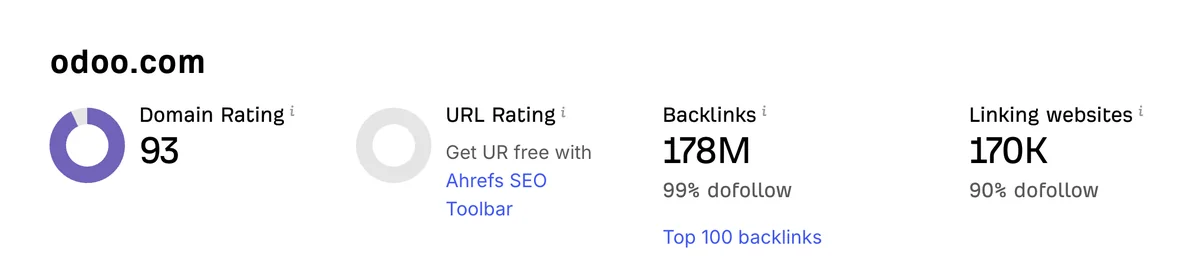
Hundreds of millions of domains exist, so that is a tiny top slice of the web. DR is a log scale: the gap between DR 70 and DR 93 is huge, and it takes a very large number of linking domains to get there.
Odoo earns links in many ways: content, a large partner network, a big community and real popularity. But a footer link on every Odoo website and portal is one channel no marketing budget can buy. Each launch adds more pages that link to odoo.com.
What a sitewide footer link does
- It shares your link value. Every page passes link value through its links. Say your homepage has 40 internal links and 2 footer links to odoo.com ("Powered by Odoo" and "Create a free website"). Then about 5% of the links on that page point to a software vendor instead of your own products.
- The links carry no rel attribute. In the Odoo 16 to 20 source, the attribution links carry no
rel="nofollow"orrel="sponsored". Google's spam policies list "widely distributed links in the footers or templates of various sites" as a link scheme. - It adds an off-topic link. A maker of hydraulic seals should link out to standards bodies, partners and certifications. Thousands of links to a generic website builder do not help that picture.
To be fair: Google is good at spotting template links, and it likely gives them little weight in either direction. The direct ranking cost to you is probably small. The bigger points are that your pages advertise for someone else, and that the vendor gets the benefit of the audience you paid to build.
Shopify perfected this in ecommerce. More than a million stores launched with "Powered by Shopify" in the footer. Odoo took the same idea further, into job posts, event pages, forums, the customer portal and every outgoing email.
Where "Powered by Odoo" hides, layer by layer
"Just delete it from the template" fails because the branding is not in one place. It is spread across four layers: the email layouts, the website and portal templates, the web client, and app-specific screens such as the POS and the attendance kiosk.
1. Emails: the line is not in your template
Almost every admin tries the same thing first. Open Settings, then Technical, then Email Templates. Open "Sales: Send Quotation". Search the HTML for "Odoo". Nothing. Send the quote anyway, and "Powered by Odoo" appears at the bottom.
The reason is that a mail.template only holds the inner message. When Odoo sends it, it wraps that body in a layout template, usually mail.mail_notification_layout or mail.mail_notification_light. The attribution lives in the layout. Here is the footer of mail_notification_layout as it ships in Odoo 19:
<div t-if="show_footer" style="color: #555555; font-size:11px;">
Powered by <a target="_blank" href="https://www.odoo.com?utm_source=db&utm_medium=email"
t-att-style="'color: ' + (company.email_secondary_color or '#875A7B') + ';'">Odoo</a>
<span t-if="show_unfollow" id="mail_unfollow">
| <a href="/mail/unfollow" style="text-decoration:none; color:#555555;">Unfollow</a>
</span>
</div>Two details stand out. First, the link carries UTM tags (utm_source=db, utm_medium=email), so Odoo can measure the traffic your customer emails send it. Second, the "Unfollow" link lives in the same block. Hide the whole block and you remove your recipients' way to unfollow a thread.
The layouts are not the only source. In Odoo 19 we also found "Powered by Odoo" links written straight into emails from auth_signup (portal invitations and password emails), digest (KPI digests), im_livechat, website_slides, website_profile, gamification, hr_expense and lunch. Each one needs its own fix.
2. Website and portal: one message, many variants
Even if your marketing site runs on WordPress or Webflow, your customers still see the Odoo portal at /my to pay invoices and sign quotes. Its footer calls web.brand_promotion, which calls this template in addons/web/views/webclient_templates.xml:
<template id="brand_promotion_message" name="Brand Promotion Message">
<t t-set="odoo_logo">
<a target="_blank"
t-attf-href="http://www.odoo.com?utm_source=db&utm_medium=#{_utm_medium}"
class="badge text-bg-light">
<img alt="Odoo"
src="/web/static/img/odoo_logo_tiny.png"
width="62" height="20"
style="width: auto; height: 1em; vertical-align: baseline;"/>
</a>
</t>
<t t-set="final_message">Powered by %s%s</t>
<t t-out="final_message % (odoo_logo, _message and ('- ' + _message) or '')"/>
</template>The phrase is assembled with string formatting, so a search for the literal text "Powered by Odoo" can miss it. The _message slot lets other apps add their own pitch. Install Website and it becomes "Create a free website". Install eCommerce and it becomes "The #1 Open Source eCommerce", each with its own tracked link.
There is one helpful toggle. In the website editor, the footer has a "Copyright" option that hides the whole copyright bar, attribution included. It also hides your own copyright line, and it does nothing for the portal, the login page or emails.
3. The login page, tabs, bots and error dialogs
- Login page (/web/login). Below the button sit "Manage Databases" and "Powered by Odoo". The first one is also a security issue on a public server, as you will see below.
- Browser tabs. In Odoo 16 the web client sets every tab title to end in "Odoo", using a key named
zopenerp, a leftover from the OpenERP days. From Odoo 17 the title service only falls back to "Odoo" when a screen has no title of its own. - OdooBot. New users are greeted by "OdooBot", with an Odoo avatar and Odoo-branded tips.
- Error dialogs. Server errors open a dialog titled "Odoo Server Error". If a customer hits one in the portal, your stack is no longer a secret.
- Live chat, POS and kiosks. The live chat page says "Website Live Chat Powered by Odoo". POS receipts and the customer display carry "Powered by Odoo", and so does the attendance kiosk.
4. Metadata and public routes
- The generator tag.
web.layoutprints<meta name="generator" content="Odoo"/>on every frontend page. That one line tells tools like BuiltWith and Wappalyzer what you run. - The database manager. On a self-hosted server,
/web/database/managerand/web/database/selectorare reachable unless you setlist_db = False. They show database names and offer backup, restore and drop actions behind the master password. - Default assets. Paths like
/web/static/img/and the Odoo favicon show up wherever you have not set your own.
The pros of debranding Odoo
- A cleaner brand. Your quotes, invoices and portal look like your company, not like a software trial. That matters most in high-value B2B sales.
- Your pages stop advertising for someone else. No more sitewide outbound links to a vendor from your own domain.
- Less to give away. Competitors cannot read your stack from your footer, your emails or your page source.
- A smaller attack surface. Hiding the platform is not security on its own. Real security is patching, closing the database manager and a reverse proxy. But scanners hunt for known platforms first, so not announcing yours is a sensible extra layer.
- Cleaner emails. Removing third-party tracking links makes your messages look more like your own mail. Expect a small effect on deliverability at best. Authentication (SPF, DKIM and DMARC) matters far more.
- White-label products. If you sell an industry solution built on Odoo, your clients should see your product name, not the platform's.
The cons and risks
Debranding done badly creates technical debt. These are the risks to weigh:
- Upgrades can break it, or bring it back. Fragile XPaths fail when Odoo changes a template, and edits made in the database get reset on update.
- Blunt find-and-replace breaks things. Replacing the word "Odoo" across translations or code can break features, URLs and module names.
- Your agreement still applies. Read your Odoo Enterprise Subscription Agreement and any partner terms before changing attribution. Make changes in your own module, never by editing Odoo's source.
- Support gets harder if you patch core. If someone edited core files, neither Odoo nor a partner can easily tell what is standard. A clean custom module keeps support simple.
- Odoo Online limits you. The standard SaaS plan does not let you install custom code modules. Full debranding needs Odoo.sh or your own server.
How to debrand Odoo safely: an upgrade-proof module
The rule is simple: never delete Odoo's templates and never edit them in the database. Put every change in a small custom module that inherits the templates and hides only what you want gone. If you delete a template ID, any module installed later that inherits it fails with an "External ID not found" error.
Website, portal and login footers
Hide the elements with t-if="False" instead of removing them. The template IDs stay intact, so other modules can still inherit them:
<odoo>
    <!-- Portal and website footer: hide the brand promotion block -->
    <template id="brand_promotion_hidden" inherit_id="web.brand_promotion">
        <xpath expr="//div[hasclass('o_brand_promotion')]" position="attributes">
            <attribute name="t-if">False</attribute>
        </xpath>
    </template>

    <!-- Login page: hide the "Powered by Odoo" link -->
    <template id="login_powered_by_hidden" inherit_id="web.login_layout">
        <xpath expr="//a[contains(@href, 'utm_medium=auth')]" position="attributes">
            <attribute name="t-if">False</attribute>
        </xpath>
    </template>

    <!-- Every frontend page: drop the generator meta tag -->
    <template id="generator_meta_removed" inherit_id="web.layout">
        <xpath expr="//meta[@name='generator']" position="replace"/>
    </template>
</odoo>
Email layouts: replace the footer, keep Unfollow
In emails, the "Powered by" text and the Unfollow link share one block. So rebuild that block with your own footer and keep the Unfollow link. Target the Odoo link by its href, not by its position in the table, so a layout change in a minor release does not break your XPath:
<odoo>
    <template id="mail_layout_footer_rebranded" inherit_id="mail.mail_notification_layout">
        <xpath expr="//a[contains(@href, 'utm_medium=email')]/.." position="replace">
            <div t-if="show_footer" style="color: #555555; font-size: 11px;">
                <span t-out="company.name"/>
                <span t-if="show_unfollow" id="mail_unfollow">
                    | <a href="/mail/unfollow" style="text-decoration:none; color:#555555;">Unfollow</a>
                </span>
            </div>
        </xpath>
    </template>
</odoo>
Repeat this for mail.mail_notification_light, where the same footer sits inside a table cell, so keep the <td> structure. Then deal with the emails that write the link into their own body. Some of these, like the auth_signup invitation and password emails and the digest email, are stored as noupdate records. You can edit them once and the edit survives normal module updates. Check them again after a major upgrade.
Browser titles, bots and server settings
- Tab titles and dialogs. Use Odoo's own
patch()utility in a JavaScript file in your module's asset bundle. Never edit Odoo's JavaScript files. - OdooBot. Rename the bot's partner record and change its avatar from the user interface. That is data, not code, so you do not need a module for it.
- Database manager. Set
list_db = Falsein your Odoo configuration file and block/web/database/*at your reverse proxy. Our Nginx reverse proxy guide shows how.
Community modules exist too. The OCA server-brand repository has small, focused debranding modules. They are a good starting point. Read what each one overrides before you install it, because some patch Python methods and need care at upgrade time.
The hidden danger: DIY debranding during migrations
If you plan to move from Odoo 15, 16, 17 or 18 to a newer version, debranding matters more than it looks. An upgrade runs in two phases. First it migrates the data and schema. Then it rebuilds every inherited view and recompiles the asset bundles. Both phases can trip over a bad debranding job.
Case A: views edited in the database
Someone opened Settings, then Technical, then Views, and deleted the "Powered by" lines by hand. Those edits live in the arch_db column of ir_ui_view. During an upgrade, one of two things happens. The upgrade overwrites the edits, and the branding is back on every invoice the next morning. Or the edited view blocks the upgrade, because newer child views expect elements you deleted.
Case B: a heavy third-party module
Some all-in-one debranding modules hook into dozens of models and patch core Python methods. They are tied to one exact version. The official upgrade service and OpenUpgrade do not migrate those patches. Some modules also change core records, such as the OdooBot partner, system parameters or email bodies. The upgrade then meets data it does not expect, and fails with hard-to-read errors.
How we handle it as an Official Odoo Partner
We treat the migration and the debranding as one project:
- Audit. We check
ir_ui_view,ir_model_data,mail_templateandir_assetfor hand edits, list every debranding module and what it changes, and map every customer-facing place that still shows Odoo. - Clean up. On a staging copy, we move your branding choices into version-controlled code, uninstall fragile modules, and reset edited views to standard. The upgrade then runs on a clean base.
- Rebrand. On the new version, we deploy one small module: inherited templates with stable selectors, rebuilt email footers that keep Unfollow, and JavaScript patches for titles and dialogs. No core business logic is touched.
- Verify. We crawl your public pages for links to odoo.com, send test quotes, invoices and password emails and read the raw source, and confirm the database manager and generator tag are gone.
If an upgrade is on your roadmap, see our Odoo migration service.
Is your Odoo leaking your brand? A 5-minute audit
- Email test. Find a recent quote or invoice your Odoo sent. Scroll to the bottom. If you see "Powered by Odoo", hover the link. If it ends in
utm_source=db&utm_medium=email, your customer emails carry tracked links to Odoo. - Password and invitation test. In a private window, go to /web/login and reset the password of a test user. Check the bottom of that email.
- Portal test. Log in as a test customer at /my/home and open an unpaid invoice. Look at the sidebar and the footer, next to the payment button.
- Page source test. On any page, press Ctrl+U. Search for "generator" and for "odoo.com". Count how often Odoo appears in your own HTML.
- Database manager test. Visit /web/database/manager and /web/database/selector on your domain. If either one loads, your database names are public. Fix that first, whatever you decide about branding.
Frequently asked questions
Is it allowed to remove "Powered by Odoo"?
Odoo Community is open source under the LGPL, and changing how your own instance looks is normal practice. On Odoo Enterprise, read your subscription agreement and any partner terms first. In every case, make the change in your own custom module and never edit Odoo's source files.
Why is "Powered by Odoo" not in my email template?
Because Odoo adds it when it sends the email. A mail template only holds the message body. Odoo wraps that body in a layout template, such as mail.mail_notification_layout or mail.mail_notification_light, and the attribution lives in the layout. To remove it, inherit the layout in a custom module.
Can I debrand Odoo Online?
Only partly. The website editor can hide the website's copyright bar, which includes the attribution. But the standard Odoo Online plan does not let you install custom code modules, so you cannot change the portal, login page or email layouts. Full debranding needs Odoo.sh or your own server.
Does the "Powered by Odoo" footer link hurt my SEO?
The direct effect on your rankings is likely small, because Google gives little weight to template links. But it puts an outbound link to a vendor on every page of your site, shares a little of each page's link value, and tells anyone what platform you run. Removing it costs little when it is done in a clean module.
Will my debranding survive an Odoo upgrade?
It will if it lives in a custom module that inherits templates with stable selectors. Edits made directly in the database are often overwritten or can block the upgrade. Heavy modules that patch core Python methods usually need rework for each new version.