
Plain-English Guide
What Is a Warehouse Management System?
WMS explained: what it does, WMS vs inventory software, and when you need one
Talk to a WMS ExpertThe short answer
A warehouse management system (WMS) is software that directs the physical work inside a warehouse, receiving goods, putting them away in the right spot, picking and packing orders efficiently, shipping, and keeping counts accurate through barcode scanning. Inventory software tells you what you have; a WMS also manages where it sits and how it moves.
What does a WMS do all day?
A working WMS runs the warehouse's daily loop: receiving inbound shipments against purchase orders, assigning putaway locations, batching and routing picks so workers walk less, validating every move with a barcode scan, printing labels and shipping, then running cycle counts so stock stays accurate without ever shutting the building down for a yearly count.
The payoff: fewer mis-picks and mis-ships, faster order turnaround, and stock records you can actually trust.
WMS vs inventory management: what is the difference?
Inventory management answers one question, how many do we have and when do we reorder. A WMS answers a different one: where exactly is it, and what should each worker do next, covering locations, bins, pick paths, wave picking, packing validation. Small operations do fine with inventory management alone; the WMS layer earns its keep once you're juggling multiple zones, several pickers, or thousands of SKUs.
As a rule of thumb, once finding an item takes longer than picking it, or two pickers keep colliding in the same aisle, you've reached WMS territory.
Do you need a standalone WMS or an ERP with WMS built in?
Standalone WMS products, the tier people compare as Fishbowl, ShipHero, or enterprise systems like Manhattan, go deep but add one more system to integrate with your accounting, sales, and purchasing. An ERP with a real WMS built in, such as Odoo Inventory with barcode, multi-warehouse, lots and serials, putaway rules, and wave picking, keeps warehouse moves, stock valuation, and the ledger in a single database.
For most SMBs, the integrated route wins out: one vendor, one database, warehouse operations that post straight to accounting with no sync jobs required.
See a warehouse flow in 3D
The four zones a WMS coordinates, receiving, storage, picking and shipping, shown on a low-poly warehouse you can orbit and explore. The 3D scene loads only when you ask for it, so the article stays light.
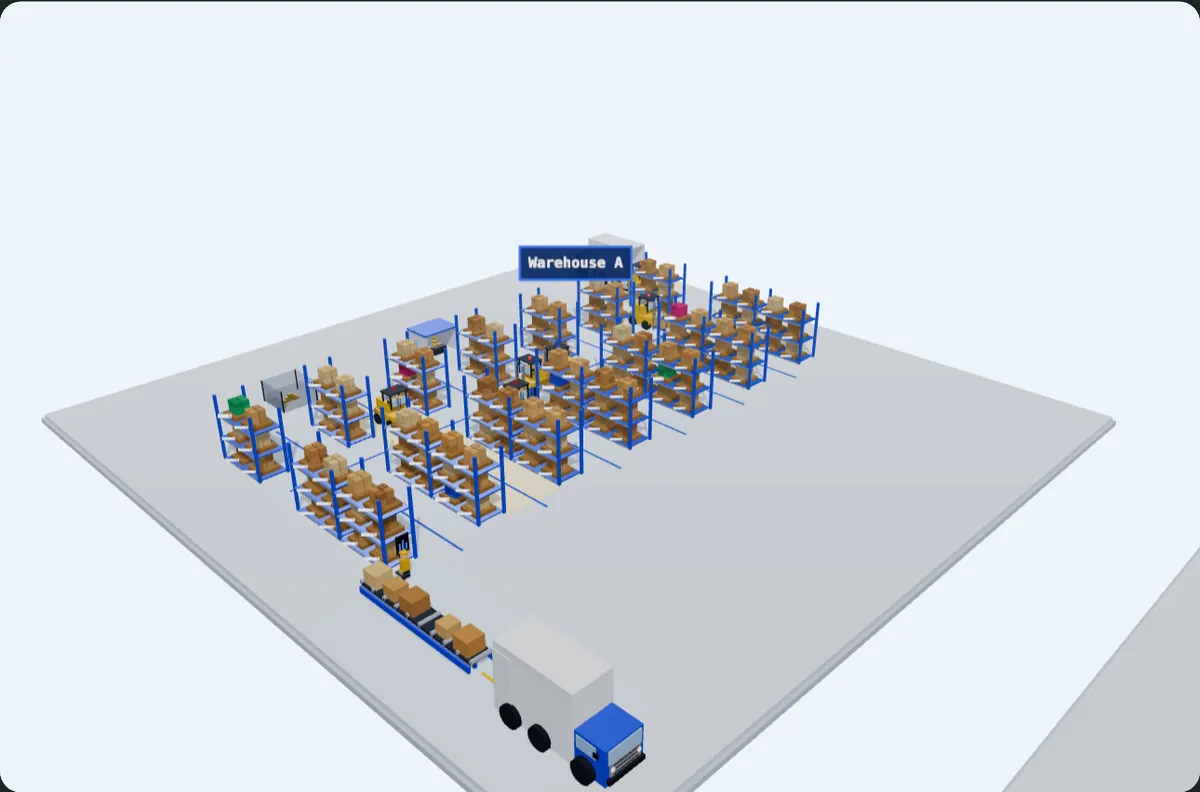
- Step 1
Receiving
Inbound trucks are unloaded and pallets are checked in against the purchase order.
- Step 2
Storage
Pallets are put away into racking, with every location tracked by bin and lot.
- Step 3
Picking
Forklifts and pickers pull stock from racking to fulfil outbound orders.
- Step 4
Shipping
Picked boxes ride the conveyor to the dock and load onto outbound trucks.
Built procedurally with Three.js, no external 3D models. Open the full-screen demo
What Odoo Inventory covers out of the box
- Multi-warehouse and multi-location with putaway and removal strategies
- Barcode app for receipts, picks, packs, transfers and cycle counts
- Lot and serial tracking with expiry dates (FIFO, LIFO, FEFO)
- Wave, batch and cluster picking to cut walking time
- Carrier connectors for label printing and live shipping rates
- Real-time valuation posting straight into Odoo Accounting
Get a warehouse workflow assessment
Octura is an Odoo Partner serving the US and Canada, and we'll map your receiving-to-shipping flow, size the right WMS scope, and hand you a realistic plan and budget, free of charge.
Talk to a WMS ExpertWarehouse management systems: frequently asked questions
What is a warehouse management system in simple terms?
A WMS is software that runs the physical work of a warehouse, receiving, putaway, picking, packing, shipping, and counting, usually with barcode scanners validating each step. It keeps stock records accurate and tells every worker their next best task.
What is the difference between a WMS and inventory management software?
Inventory software tracks quantities and reorder points, essentially what you have. A WMS adds a physical layer on top: exactly where each unit sits, how it should move, and in what order workers should pick it. Many systems blur that line; Odoo covers both layers within its Inventory app.
What is WMS in ERP?
It refers to a warehouse module built into an ERP suite rather than purchased as a separate product. The advantage is a single database, so a barcode scan that moves stock also updates valuation and accounting instantly. Odoo's built-in WMS handles multi-warehouse, barcode workflows, lots and serials, and wave picking, capabilities that historically demanded a standalone WMS.
Is Odoo a warehouse management system?
Yes, Odoo Inventory is a full WMS built into the Odoo ERP: multi-warehouse and multi-location support, barcode-driven receiving, picking, packing, and shipping, putaway and removal strategies, lot and serial traceability, and cycle counts, with everything posting to accounting in real time. For most SMB warehouses, it replaces a standalone WMS entirely.
How much does a WMS cost?
Standalone WMS pricing runs anywhere from modest monthly subscriptions to full enterprise contracts, plus the ongoing cost of integrating it with your ERP or accounting. With Odoo, the WMS comes bundled into the standard per-user subscription, so the real cost sits in implementation: workflow design, barcode hardware, and training. See our pricing page for current figures.
Does Octura implement warehouse management?
Yes, warehouse and inventory projects are one of Octura's core practices across the US and Canada, spanning workflow mapping, Odoo Inventory and Barcode configuration, scanner hardware guidance, data migration from spreadsheets or a legacy WMS, and floor-level training at go-live.