
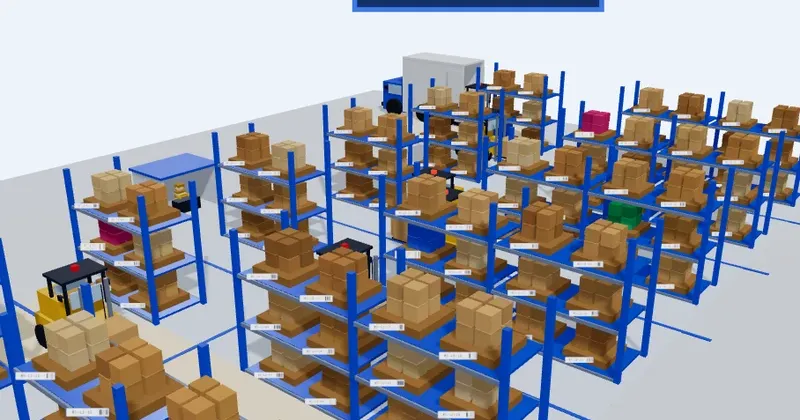
See it in action: an interactive 3D warehouse
Reading about bin locations and pick routes only goes so far. Below is an interactive, low-poly 3D model of a working warehouse floor, built to walk through the flow described in this guide: drag to orbit, scroll to zoom, and tap a zone to follow a pallet from receiving to storage, picking, and shipping. Every rack slot carries its own bin location code and barcode placard, and forklifts run their routes continuously in the background, the way they would on a live floor.
The demo shows three separate warehouse sites so the same view scales the way a real multi-site operation would: each site runs its own zones and forklifts, and switching sites is the same "one dashboard, every location" idea covered below, just rendered in three dimensions instead of a table.
What actually counts as a WMS, and where Odoo fits
A warehouse management system tracks where every unit of stock sits, directs staff on where to put it away and where to pick it from, and records every movement with enough detail to trace a defect back to its source. That's a higher bar than a spreadsheet or a basic "quantity on hand" screen, and it's the bar Odoo's Inventory app is built to clear: multi-step routes, storage categories, putaway and removal strategies, barcode-driven operations, and full lot and serial traceability all ship in the same app that also runs sales orders and purchasing.
The distinction that matters commercially is that this isn't a WMS module bolted onto an ERP through an integration. It's the same tables, the same product record, the same stock move ledger that Sales, Purchase, Manufacturing, and Accounting already read from. A reservation made on a sales order and a putaway rule triggered on a receipt are two views into one operation, not two systems kept in sync by a nightly sync job.
See the 10-feature rundown of what this replaces →Multi-warehouse, multi-location structure
Odoo models a warehouse as a tree of locations: the warehouse itself, then zones inside it (receiving, stock, quality, packing, shipping), then racks, aisles, and individual bins underneath those. Every one of those levels is a real record you can report on, restrict access to, or route stock through, not a free-text field.
Running more than one physical site doesn't mean running more than one instance. Each warehouse gets its own routes, reordering rules, and stock levels, while a single dashboard shows quantity on hand across every location at once. Inter-warehouse transfers move stock between sites with the same traceability as any other operation, and consolidated reporting rolls every warehouse's activity up to one view for a controller or ops manager who needs the whole network, not just one building.
Putaway rules and removal strategies
Putaway rules decide where a received product goes without a supervisor having to point at a rack. Rules can route by product category, package type, or storage category capacity, so heavy pallets land on ground-level bins automatically and small parts route to a pick face instead of deep reserve storage.
Removal strategies decide the reverse: which unit gets picked first. FIFO pulls the oldest stock, LIFO pulls the newest, and FEFO pulls whatever expires soonest, applied per product or per category. For anything with a shelf life, FEFO alone materially cuts write-offs, since the system enforces the rule on every pick instead of relying on a picker to check dates by eye.
See how reorder rules prevent stockouts →Barcode scanning and the mobile warehouse app
Odoo's Barcode app runs on ordinary Android or iOS devices and on dedicated handheld scanners, with no separate scanning-software license to buy. Receiving, putaway, internal transfers, picking, packing, and shipping can all be confirmed by scanning a barcode against the operation on screen, which removes the manual "type the location code" step where most warehouse data errors originate.
Batch transfers let one operator scan and confirm several orders in a single pass through the aisles instead of walking the same route once per order. Every scan writes directly to the same stock ledger the office sees in real time, so a picker confirming a pallet in Bin R3-L2-07 updates availability for a sales order being quoted at that exact moment.
Barcode hardware setup and troubleshooting →Wave, batch, and cluster picking for throughput
As order volume grows, picking one order at a time stops scaling. Wave picking releases a group of orders together on a schedule, batch picking lets one picker collect items for multiple orders in a single trip organized by location rather than by order, and cluster picking splits a cart into several order totes so one pass through the warehouse fulfills many orders at once.
All three are configuration, not custom development: routes and picking policies are set per warehouse and per product, and the same barcode app guides the picker through whichever method is active. The result is throughput that grows with better routing and batching instead of growing headcount at the same rate as order volume.
Replenishment, reordering, and cross-docking
Reordering rules watch stock levels per warehouse and trigger a purchase or manufacturing order automatically once quantity on hand drops to a minimum, refilling up to a target maximum. Lead times, vendor minimums, and safety stock all factor into the calculation, so the reorder point reflects how long replenishment actually takes rather than a guess.
Push and pull routes handle the more advanced cases without custom code: make-to-order procurement, cross-docking stock straight from receiving to an outbound shipment without a putaway step, and drop shipping that routes a sale directly to the vendor for fulfillment while Odoo still tracks the transaction end to end.
Push, pull, and make-to-order routing explained →Full traceability: lots, serials, and quality control
Every lot or serial number is tracked from the vendor it was received from, through every internal move, to the specific sales order and customer it shipped on. If a defect surfaces after the fact, tracing which customers received an affected lot is a report, not a warehouse-wide search.
Quality checkpoints can be inserted directly into a receiving or manufacturing operation: an inspection that fails routes the lot to a quarantine location automatically, instead of relying on a label and a hope that nobody moves it. Combined with FEFO removal, that gives a warehouse the same recall-readiness a dedicated QMS would provide, built into the same operation that already handles putaway.
Lot and serial traceability, receipt to customer →The advantages, side by side
Every feature above maps to a concrete advantage over running warehouse operations on a spreadsheet, or on a standalone WMS connected to the rest of the business through middleware.
| Odoo WMS capability | What it replaces | The advantage |
|---|---|---|
| Shared database with Sales, Purchase, Manufacturing | Middleware or iPaaS syncing a separate WMS | No connector fees, no sync lag, no broken mapping when an API changes |
| Native Barcode app on standard Android/iOS devices | A dedicated scanning-software license | Lower hardware and licensing cost per warehouse seat |
| Putaway rules and removal strategies (FIFO/LIFO/FEFO) | Manual placement decisions and paper pick lists | Fewer misplaced pallets and less shelf-life write-off |
| Automated reordering rules and push/pull routes | Manual reorder points tracked in a spreadsheet | Fewer stockouts and less cash tied up in overstock |
| Wave, batch, and cluster picking | One picker, one order, one trip through the aisles | Throughput scales with routing, not headcount |
| Lot/serial traceability with quality checkpoints | A separate quality-management system | Recall-ready traceability without a second license |
| One dashboard across every warehouse | Per-site spreadsheets reconciled at month end | Real-time stock visibility for the whole network |
Add those up and the pattern is consistent: nothing here is a warehouse-only feature bought and licensed on its own. It's warehouse functionality that was already part of the platform running the rest of the business, which is the same argument that applies to Odoo's ROI in general, just measured one floor at a time.